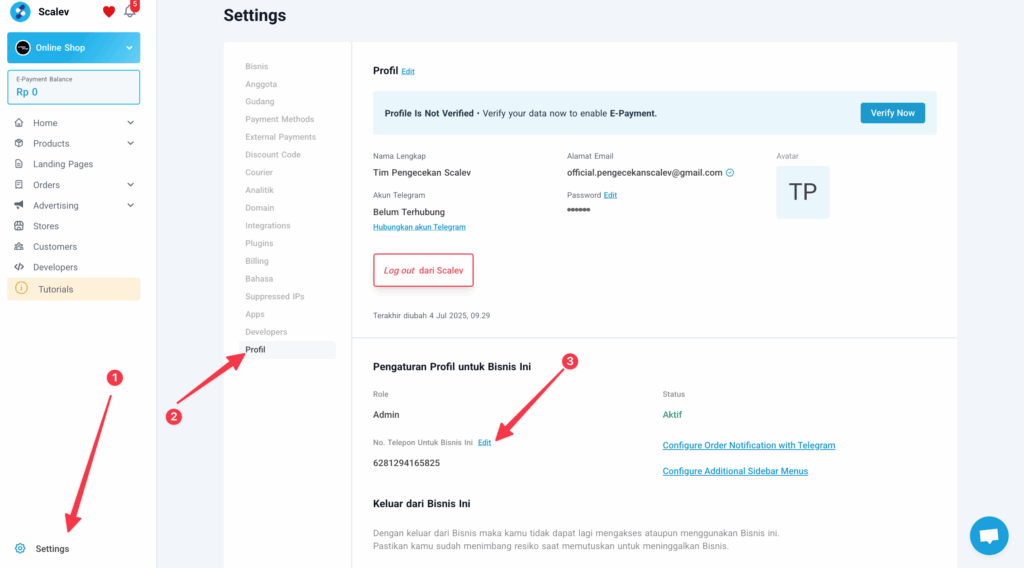
The WhatsApp number on the invoice follows 2 WhatsApp numbers: First: The Owner’s Business WhatsApp number registered in Scalev, if no Sales Person is assigned to that store 🙏 → How to change it: Go to Setting → Profile → Phone Number for This Business → EditDocumentation Index
Fetch the complete documentation index at: https://docs.scalev.com/llms.txt
Use this file to discover all available pages before exploring further.
 Second:
The Sales Person’s number assigned to that store.
→ How to change it: Log in to Scalev using the Sales Person account → go to Setting → Profile → Phone Number for This Business → Edit
Second:
The Sales Person’s number assigned to that store.
→ How to change it: Log in to Scalev using the Sales Person account → go to Setting → Profile → Phone Number for This Business → Edit
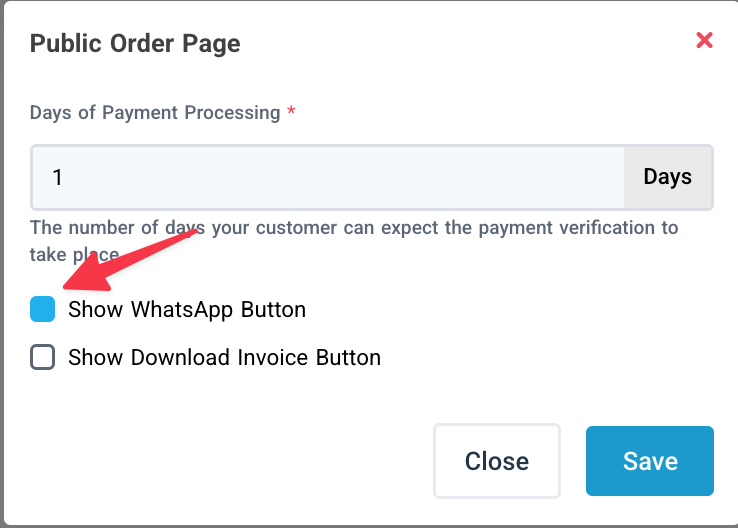
The WhatsApp number on the invoice page can also be disabled: Go to Store → Public Order Page → Open Then uncheck Show WhatsApp Button → Save → Save Store settings