

After registering in Scalev, you can update your business user settings if they don’t match your business needs. Things you can change in business user settings:Documentation Index
Fetch the complete documentation index at: https://docs.scalev.com/llms.txt
Use this file to discover all available pages before exploring further.
- Business avatar (not visible to your customers).
- Business name (not visible to your customers).
- Username (this affects the default slug you use in Scalev).
 #2. Click Edit in the Business sub-menu next to My Business
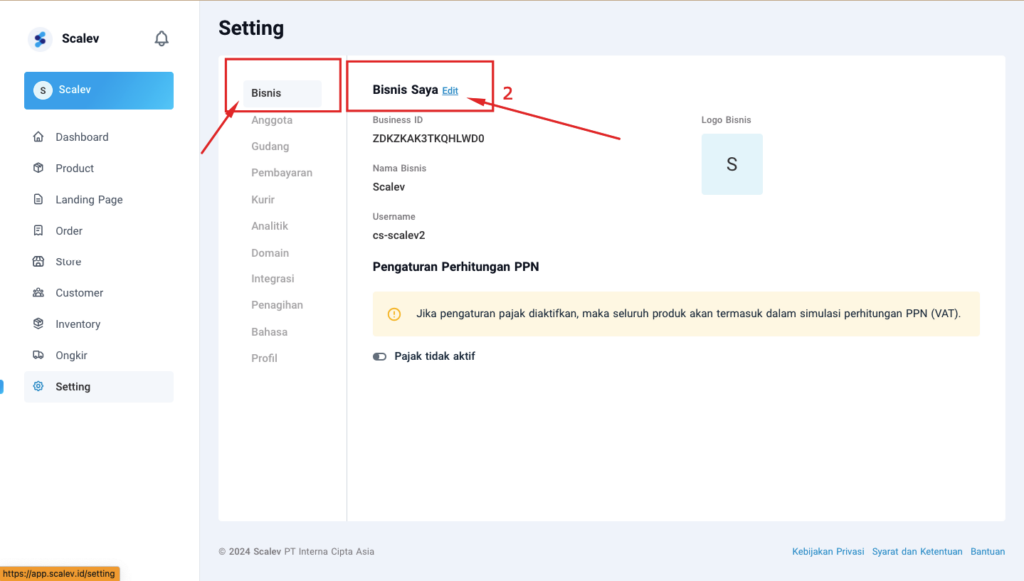 #3. Upload Avatar (square size)
#4. Enter the business name you want.
#5. Enter the username (no spaces) to use as your Scalev slug.
#6. Click Save
#3. Upload Avatar (square size)
#4. Enter the business name you want.
#5. Enter the username (no spaces) to use as your Scalev slug.
#6. Click Save
 After that, My Business details in your Scalev sub-menu will update to match the new data you just entered.