

Documentation Index
Fetch the complete documentation index at: https://docs.scalev.com/llms.txt
Use this file to discover all available pages before exploring further.
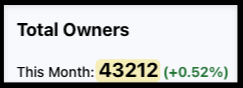 Above is the number of Scalev users at the time this was written.
What I want to share here is the conclusion from teaching that many people about custom domains.
⇣
There are 2 types of people when setting up a custom domain:
Above is the number of Scalev users at the time this was written.
What I want to share here is the conclusion from teaching that many people about custom domains.
⇣
There are 2 types of people when setting up a custom domain:
- Type 1: I’ll do it my own way.
- Type 2: OK, I’ll follow the tutorial exactly.
- Only buy a Domain from a third-party domain provider, without buying Hosting — use Scalev’s hosting.
- REQUIRED to use Cloudflare.
- Move DNS management for your domain from your domain registrar to Cloudflare! ← Follow this. Don’t try managing it directly in your domain provider’s DNS manager.
- Add your custom domain to your Scalev account.
- How to open your landing page in Scalev via your custom domain.