

TL;DRDocumentation Index
Fetch the complete documentation index at: https://docs.scalev.com/llms.txt
Use this file to discover all available pages before exploring further.
-
Scalev Fee 1% :
- Basic, Pro, and Ultimate plans if the checkout page has activated its own custom domain
-
Scalev Fee 5% :
- Free plan or paid plans using the *.myscalev.com subdomain
- Lite plan (regardless of which custom domain is used on the checkout page)
- All plans will be subject to a Transaction Fee according to the rules of the PG used (Xendit, check here).
Prolog #1:
The discussion on this page (scheme, conditions, fee amounts, etc.) is OUTSIDE the “BANK TRANSFER” payment method. For the Bank Transfer payment method in Scalev, it applies to PAID users:- Starting from Lite, Basic, Pro, and Ultimate plans: AVAILABLE (can use) ✅
- 0% Fee (Scalev does not charge a single cent on those order invoices) ✅
Prolog #2:
If there is a word/amount “FEE” in the video below… It refers to the FEE charged by Scalev to the Scalev user. Its name: Scalev Fee. As for the fee charged by the payment gateway, that’s different. (Fee amount can be found here) Its name falls under Transaction Fee. === E-Payment refers to the payment receiving method from customers to Scalev users. Which includes:- VA (virtual account),
- QRIS,
- LinkAja,
- Dana,
- Ovo,
- Shopeepay,
- Transaction Fee, costs set by Xendit
- Scalev Fee, costs set by Scalev
- If you transact a digital product using a payment gateway (Xendit)
- If you transact a physical product using the COD payment system (paid to the courier/Ninja)
Transaction Fee Discussion
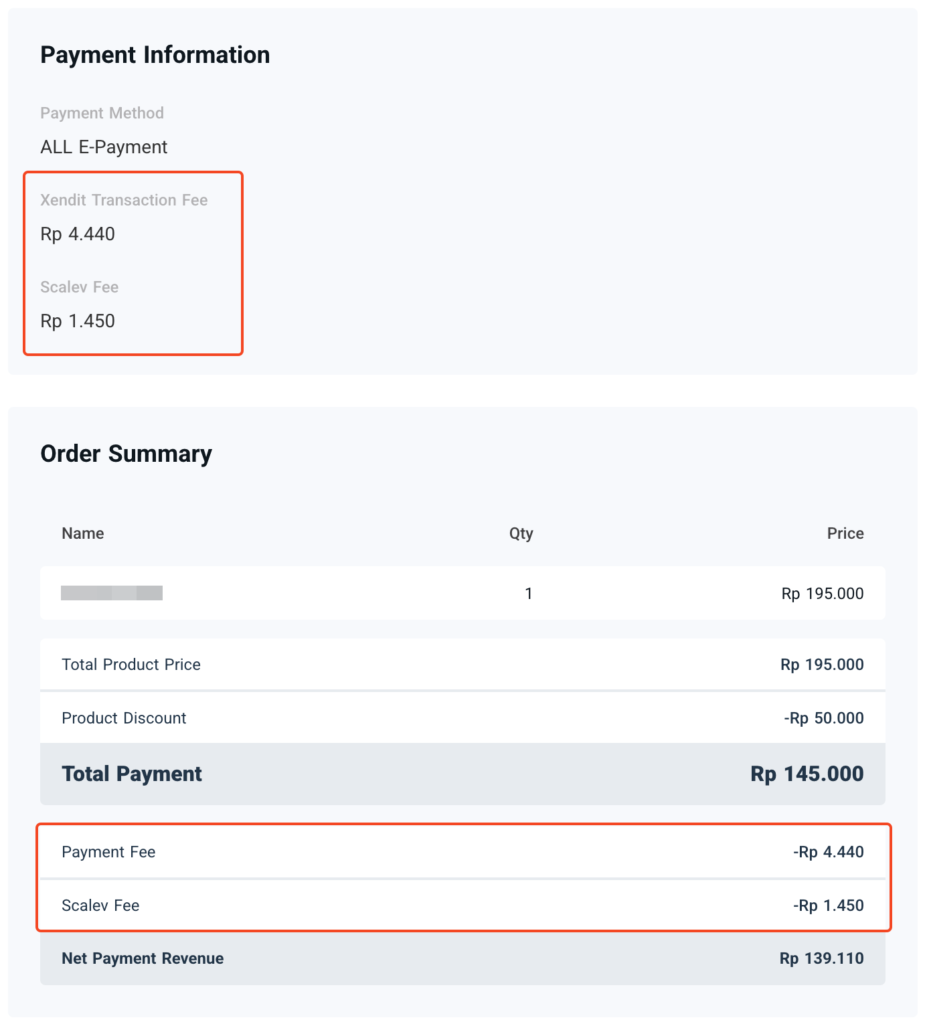 Example of Transaction Fee & Scalev Fee
All types of Scalev plans, whether…
Example of Transaction Fee & Scalev Fee
All types of Scalev plans, whether…
- Free
- Lite
- Basic
- Pro
- Ultimate
Scalev Fee Discussion
Scalev Fee is a fee charged to users based on the active plan and the LP link used by the user. This fee is set by Scalev. Scalev Fee has 2 fee amounts based on the conditions you use on your Scalev account:A. 5% Fee
This fee applies under 2 conditions:- All plans still using Scalev’s free subdomain (*.myscalev.com) on their checkout page link.
- Scalev Lite plan, even if already using your own Custom Domain.
B. 1% Fee
This fee applies specifically to 3 Scalev plans:- Basic Plan
- Pro Plan
- Ultimate Plan.
| Free | Lite | Basic | Pro | Ultimate | ||||||
|---|---|---|---|---|---|---|---|---|---|---|
| 5% Scalev Fee | 5% Scalev Fee (also applied to Custom Domain) | 5% Scalev Fee or 1% if using Custom Domain | 5% Scalev Fee or 1% if using Custom Domain | 5% Scalev Fee or 1% if using Custom Domain |
VIDEO Explanation:
===
Examples?
If you need a real example of E-Payment subject to the above provisions, you can watch the video in this article: https://tutorial.scalev.id/detailepayment/Have Questions?
Please comment below. Or if you want to ask directly with Scalev Support:-
If you are a PAID user:
- Chat via the widget in the bottom right corner.
- Or contact the VIP Support Telegram that has been provided.
-
If you are a FREE user:
- Please ask via email. At cs [at] scalev.id